n8n vs Zapier vs Make: Which Automation Tool Should You Use?
The Short Answer
This n8n vs Zapier vs Make comparison is not about finding one perfect tool. It is about choosing the right tool for the workflow you actually need to build.
If you are trying to choose between n8n, Zapier and Make, here is the simplest answer:
Use Zapier if you want the easiest way to connect apps quickly.
Use Make if you want a visual automation builder with more flexibility.
Use n8n if you want more control, more technical freedom and stronger long-term automation possibilities.
That is the quick version.
The longer version is where things get more interesting.
Because choosing an automation tool is a bit like choosing a car.
A small automatic city car is great if you just want to get from A to B.
A van is better if you are moving furniture.
And a heavily modified project car is great if you enjoy spending weekends asking yourself why something that worked yesterday has suddenly stopped working today.
Automation tools are similar.
Zapier, Make and n8n can all help you connect apps and automate repetitive work.
But they are not the same.
They feel different.
They are built for slightly different users.
And the best one depends on what you are trying to automate.
Why This Comparison Matters
Automation is no longer just about connecting one app to another.
A few years ago, a typical automation looked like this:
“New form submission → add row to spreadsheet.”
Useful, but simple.
Now, automation workflows can include:
- AI summaries
- Lead scoring
- CRM updates
- Slack notifications
- Payment confirmations
- Database changes
- Email sequences
- Webhooks
- Custom logic
- Human approval steps
- AI agents
- Internal dashboards
That means choosing the right tool matters more than it used to.
If you choose something too basic, you may outgrow it quickly.
If you choose something too technical, you may spend three hours trying to work out why a webhook is angry with you.
Nobody wants an angry webhook.
So let’s break down n8n vs Zapier vs Make in a practical way.
What Is Zapier?
Zapier is one of the easiest automation tools to understand.
The basic idea is simple:
When something happens in one app, do something in another app.
For example:
- When someone fills in a form, add them to a CRM.
- When a new lead arrives, send a Slack message.
- When a payment is completed, send a confirmation email.
- When a new row is added to Google Sheets, create a task.
Zapier calls these automations “Zaps”.
Zapier is popular because it is simple, friendly and connects to a huge number of apps.
It is usually the easiest tool for beginners.
If you have never built an automation before, Zapier is often the fastest way to get your first workflow working.
You do not need to think too much about infrastructure, hosting, servers or technical setup.
You choose a trigger.
You choose an action.
You connect the accounts.
You test it.
Done.
Well, hopefully done.
Automation still finds ways to humble everyone eventually.
Where Zapier Works Best
Zapier is best when you want to automate simple business tasks quickly.
Good examples:
- Send form submissions to Google Sheets.
- Add new leads to HubSpot.
- Send email notifications after purchases.
- Add calendar events from bookings.
- Create tasks from new messages.
- Send Slack alerts when something happens.
- Connect tools that do not already talk to each other.
Zapier is especially useful for creators, small business owners, marketers and non-technical users.
If your goal is:
“I just want this app to talk to that app without turning it into a full engineering project.”
Zapier makes sense.
Where Zapier Can Feel Limited
Zapier is great for simple workflows.
But once the workflow becomes more complex, it can start to feel limited or expensive.
For example, you may run into problems when you need:
- Advanced branching logic
- Complex data transformation
- Custom API calls
- Self-hosting
- More control over execution
- More technical debugging
- Complex multi-step workflows
- Lower-cost scaling for lots of tasks
This does not mean Zapier is bad.
It means Zapier is designed to make automation easy.
That ease is the benefit.
But it also means you may have less control compared with more technical tools.
What Is Make?
Make is a visual automation platform.
It lets you build workflows by connecting modules together on a canvas.
If Zapier feels like filling out a step-by-step form, Make feels more like drawing a workflow map.
You can see the flow.
You can add branches.
You can add filters.
You can watch data move through the scenario.
That visual approach is one of Make’s biggest strengths.
It is still no-code or low-code, but it gives you more flexibility than basic app-to-app automation.
A Make workflow might look like this:
- Watch for a new form submission.
- Check if the lead selected a specific service.
- Add the lead to a CRM.
- Send a different email depending on the service.
- Add the lead to a spreadsheet.
- Notify the team in Slack.
- Create a follow-up task.
The visual builder makes it easier to understand what is happening.
Especially when the workflow has multiple branches.
Where Make Works Best
Make is useful when your workflow is visual, multi-step or slightly more advanced.
Good examples:
- Lead routing workflows
- Content publishing workflows
- Marketing operations
- CRM updates
- Data enrichment
- Reporting workflows
- Multi-step approval processes
- Conditional workflows
- E-commerce automations
Make is a good middle ground.
It gives you more flexibility than Zapier, but it is usually easier to approach than n8n if you are not technical.
If you like seeing workflows as diagrams, Make is nice.
It feels more like building with blocks than filling in a form.
Where Make Can Feel Limited
Make is powerful, but it can still become confusing when workflows get large.
The visual canvas is helpful until it starts looking like a map of the London Underground after someone dropped spaghetti on it.
Make can also become harder to manage when you have:
- Lots of modules
- Many routes
- Complex error handling
- Advanced API requirements
- Large data operations
- Developer-style workflows
- Strong self-hosting or ownership requirements
Again, this does not make Make bad.
It just means you need to know where it fits.
Make is strong for visual automation.
But if you want deeper technical control, n8n may be a better fit.
What Is n8n?
n8n is a workflow automation platform that gives you more control.
It lets you build automations visually, but it also gives you technical flexibility when you need it.
You can connect apps.
You can use webhooks.
You can work with APIs.
You can transform data.
You can add custom code.
You can build AI workflows.
You can self-host it if you want more control over your environment.
That is why n8n is popular with developers, technical founders, automation builders and people who want to go beyond simple app-to-app workflows.
A basic n8n workflow might look like this:
- Webhook receives a form submission.
- Data is validated.
- Lead is saved to a database.
- AI summarises the enquiry.
- Lead is sent to a CRM.
- Slack notification is sent.
- Confirmation email goes to the user.
- Error handling logs failed steps.
That is a proper workflow.
Not just “when this, then that.”
More like:
“When this happens, check this, transform that, send this, wait for that, handle failures, and please do not break while I am eating dinner.”
Where n8n Works Best
n8n is best when you want flexibility and control.
Good examples:
- AI automation workflows
- Internal business systems
- Webhook-based workflows
- Database-driven automations
- Custom API integrations
- Self-hosted workflows
- Technical automations
- Data transformation
- Multi-step backend processes
- Automation linked to internal tools
n8n is especially good if you are comfortable with more technical concepts.
You do not need to be a hardcore developer, but it helps if you are not scared of things like:
- JSON
- APIs
- Webhooks
- Credentials
- Error handling
- Data mapping
- Conditional logic
If those words make you immediately want a coffee, that is normal.
But if they sound useful, n8n may be a strong choice.
Where n8n Can Feel Difficult
n8n has more power, but that power comes with more responsibility.
The learning curve is higher than Zapier.
It can feel more technical.
You may need to understand how data moves between nodes.
You may need to debug failed executions.
If you self-host it, you also need to think about updates, hosting, security and backups.
That is not a problem if you want control.
But it is a problem if you just want a simple workflow running by lunchtime.
So n8n is not always the best beginner tool.
It depends on the person.
For a non-technical small business owner, Zapier may feel easier.
For someone building serious workflows or AI automations, n8n may be much more attractive.
n8n vs Zapier vs Make: Quick Comparison
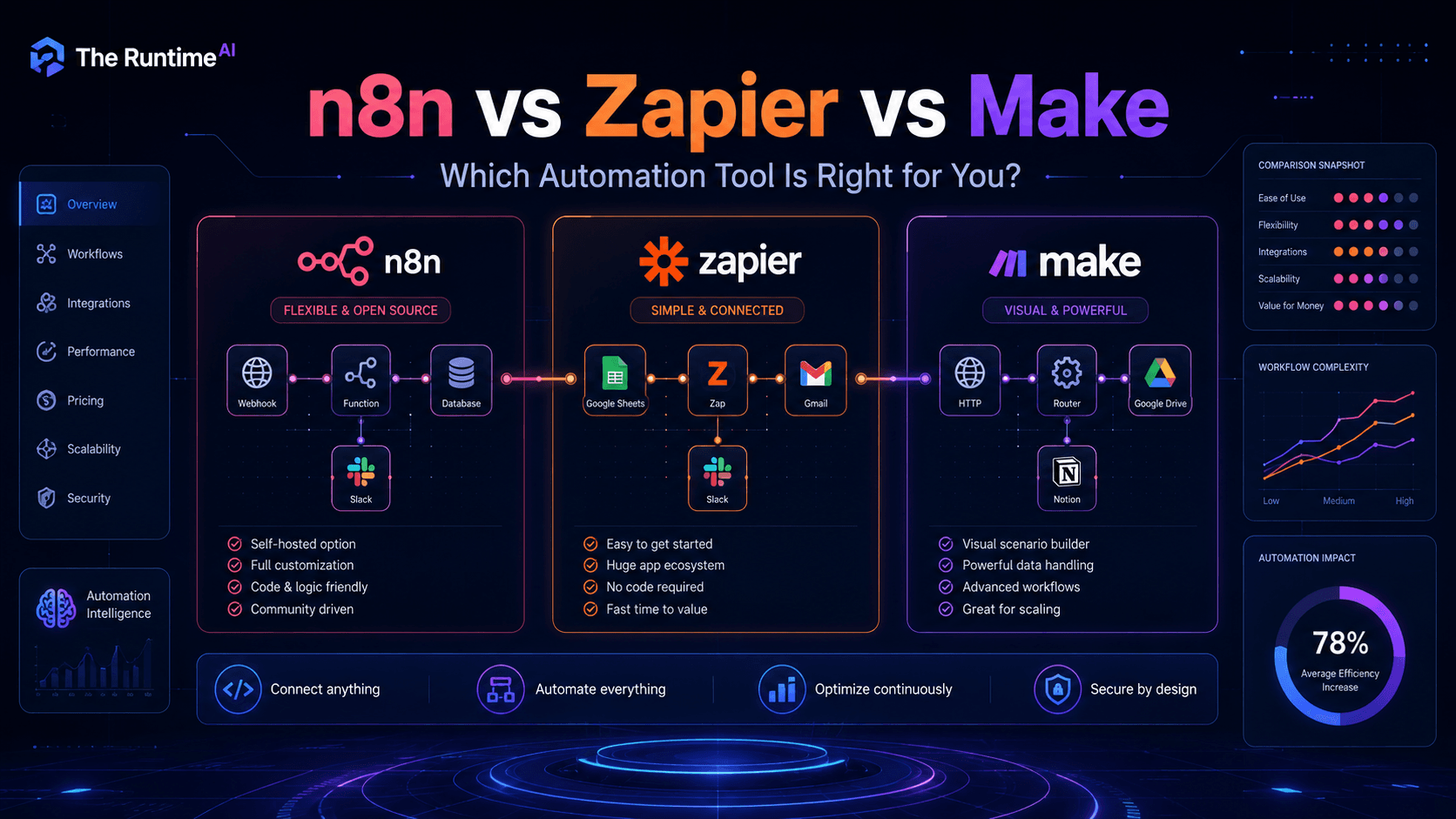
A practical n8n vs Zapier vs Make comparison becomes much easier when you look at ease of use, flexibility, AI automation, control and long-term scalability.
Here is the practical comparison.
| Feature | Zapier | Make | n8n |
|---|---|---|---|
| Ease of use | Easiest | Medium | Medium to advanced |
| Visual builder | Simple step flow | Strong visual canvas | Visual node-based workflow |
| Best for beginners | Very good | Good | Depends on technical comfort |
| Best for complex workflows | Limited to medium | Good | Very good |
| Best for AI automation | Good | Good | Very good |
| Best for custom logic | Limited | Good | Strong |
| Best for developers | Less ideal | Good | Strong |
| Self-hosting | No | No | Yes |
| Control | Lower | Medium | High |
| Speed to first automation | Fastest | Fast | Slower but flexible |
The short version:
Zapier is easiest.
Make is visual and flexible.
n8n gives the most control.
Which Tool Should Beginners Use?
If you are a complete beginner and just want to automate basic tasks, start with Zapier.
It is the least intimidating.
You can build simple automations quickly and understand the basic idea of triggers and actions.
Example:
“New Typeform response → add row to Google Sheets → send email notification.”
That is a perfect beginner workflow.
Make is also beginner-friendly, but the visual canvas may feel slightly more complex at first.
n8n can be beginner-friendly if you enjoy learning technical tools, but it is not the easiest option for everyone.
If you are new to automation and allergic to anything that looks like JSON, start with Zapier or Make.
No shame in that.
The goal is to automate work, not prove you can suffer.
Which Tool Is Best for AI Automation?
For AI automation, n8n is very strong because it gives you more control over the workflow.
AI workflows often need more than a simple trigger and action.
They may involve:
- Sending text to an AI model
- Summarising data
- Extracting structured information
- Classifying messages
- Routing results
- Checking confidence
- Logging outputs
- Handling errors
- Sending results to different tools
n8n is good for this because you can build more detailed logic around the AI step.
Make can also be good for AI workflows, especially if you want a visual builder and pre-built integrations.
Zapier also has AI features and can be great for quick AI-powered automations.
But for advanced AI workflows, n8n usually gives you more freedom.
Example:
A customer fills in a contact form.
The workflow sends the message to AI.
AI classifies it as sales, support, billing or partnership.
The workflow routes it to the right person.
It creates a CRM record.
It writes a summary.
It sends a Slack notification.
It creates a follow-up task.
That kind of workflow can be done in different tools, but n8n gives you more control over each step.
Which Tool Is Best for Small Businesses?
It depends on the business.
If the business just needs a few simple automations, Zapier may be enough.
Examples:
- Send leads to CRM
- Add email subscribers to a list
- Send notifications
- Create tasks
- Save form submissions
If the business has more complex workflows, Make may be better.
Examples:
- Different routes depending on enquiry type
- Multi-step reporting
- Marketing workflows
- Internal operations
- Content workflows
If the business needs custom systems, backend workflows, databases, webhooks or AI-heavy automation, n8n may be the better long-term option.
Examples:
- Booking systems
- Internal admin dashboards
- AI lead processing
- Custom CRM workflows
- Database-driven automation
- Payment confirmation workflows
- More technical integrations
A simple rule:
If the workflow is simple, use the simplest tool.
Do not build a spaceship when all you need is a bicycle.
But also do not bring a bicycle to a spaceship problem.
Which Tool Is Best for Developers?
n8n is usually the most developer-friendly of the three.
That is because it gives more flexibility with:
- APIs
- Webhooks
- JavaScript functions
- Data transformation
- Self-hosting
- Custom logic
- Advanced workflows
Developers may still use Zapier or Make for quick automations.
But if the workflow becomes more like backend logic, n8n feels more natural.
For example, a developer might use n8n to:
- Receive webhook data
- Validate payloads
- Call multiple APIs
- Transform JSON
- Store data in a database
- Trigger AI processing
- Send output to another system
- Log errors
That is where n8n starts to shine.
Which Tool Is Best for Non-Technical Users?
Zapier is usually the easiest.
Make is also a good option if the user likes visual workflows.
n8n can work, but it may require more learning.
For a non-technical user, the question is:
“Do I want the fastest path to a working automation, or do I want to learn a more powerful system?”
If the answer is speed, use Zapier.
If the answer is visual control, try Make.
If the answer is long-term flexibility and deeper automation, learn n8n.
Real Example: Website Enquiry Workflow
Let’s compare the same workflow across all three tools.
Scenario:
Someone fills in a website contact form.
You want to:
- Save the lead
- Send a confirmation email
- Notify yourself
- Create a follow-up task
- Use AI to summarise the enquiry
In Zapier
Zapier would be the easiest to set up.
A Zap might look like:
- Trigger: New form submission
- Action: Create CRM lead
- Action: Generate AI summary
- Action: Send Slack notification
- Action: Send confirmation email
- Action: Create follow-up task
This is clean and beginner-friendly.
Good if you want it working quickly.
In Make
Make would let you build this visually.
You could add routes like:
- If enquiry type is sales, send to CRM
- If enquiry type is support, send to support inbox
- If budget is high, create priority task
- If message is missing, notify admin
Make makes this kind of branching easier to see.
Good if your workflow has conditions and routes.
In n8n
n8n would give you the most control.
You could:
- Receive the form via webhook
- Validate required fields
- Store the lead in a database
- Send the message to an AI model
- Parse the AI response
- Route based on classification
- Log every step
- Handle errors
- Retry failed actions
- Send custom notifications
This is more technical, but also more powerful.
Good if this workflow is important to the business and needs to be reliable, flexible and customised.
Real Example: Booking System Workflow
Imagine a parent books a children’s workshop through a website.
The workflow needs to:
- Capture parent details
- Capture child details
- Check selected dates
- Confirm capacity
- Take payment
- Update booking status
- Send confirmation email
- Show booking in admin dashboard
- Allow export later
For a very simple version, Zapier might work.
For a more visual booking operations workflow, Make might work.
For a proper custom system connected to a database, payment provider and admin dashboard, n8n or a custom backend approach may be better.
This is the key lesson:
The tool depends on the workflow.
Not the other way around.
Do not choose the tool first and then force the workflow into it.
That is like buying shoes first and then trying to resize your feet.
Technically possible in a horror film.
Not ideal in business.
When to Use Zapier
Use Zapier when:
- You are new to automation
- You want the fastest setup
- Your workflow is simple
- You use common apps
- You do not need much custom logic
- You want something easy to maintain
- You prefer guided setup over technical control
Example use cases:
- Form to spreadsheet
- Form to CRM
- Payment to email
- Email to task
- Calendar to Slack
- Newsletter signup to email platform
Zapier is great when the workflow is clear and simple.
When to Use Make
Use Make when:
- You want visual workflows
- You need more branching logic
- Your workflow has multiple paths
- You want more flexibility than Zapier
- You like seeing the whole process
- You want to build more advanced no-code automations
Example use cases:
- Lead routing
- Content workflows
- Marketing operations
- Reporting workflows
- Multi-step approvals
- Data enrichment
- Conditional automations
Make is a strong middle option.
It is more flexible than simple automation tools, but still approachable.
When to Use n8n
Use n8n when:
- You want more control
- You are comfortable with technical concepts
- You need custom logic
- You want to use webhooks and APIs
- You want self-hosting options
- You are building AI automation workflows
- You need database-driven processes
- You want deeper workflow control
Example use cases:
- AI-powered lead processing
- Internal business workflows
- Custom CRM automations
- Booking system automation
- Webhook-based systems
- Data processing workflows
- Technical integrations
- Backend automation
n8n is best when you want to build workflows that behave more like systems.
The Cost Question
Cost is not just about the monthly price.
It is also about:
- How many tasks or operations run
- How often workflows trigger
- How complex the workflow is
- How much time it saves
- Whether you need paid app connections
- Whether you need self-hosting
- Whether someone needs to maintain it
A tool that looks cheap may become expensive if the workflow runs thousands of times.
A tool that looks technical may be worth it if it gives you more control and lower long-term operating cost.
The best question is not:
“Which tool is cheapest?”
The better question is:
“Which tool gives me the best balance of speed, reliability, control and cost for this workflow?”
That is less catchy.
But much more useful.
The Best Choice for Most People
Here is the practical recommendation:
If you are just starting:
Start with Zapier.
If you want more visual control:
Try Make.
If you want serious workflow control, AI automation, APIs, self-hosting or technical flexibility:
Learn n8n.
If you are building a long-term automation skillset, n8n is worth learning.
Even if you use Zapier or Make sometimes, learning n8n helps you understand automation more deeply.
You start thinking in workflows, triggers, data, conditions and edge cases.
That skill transfers across tools.
My Personal Take
If I were helping a small business automate something simple, I would not automatically choose the most powerful tool.
For a basic enquiry notification, Zapier is fine.
For a more visual multi-step process, Make is useful.
For a proper system with a database, payments, admin logic, AI processing or webhooks, I would lean towards n8n or a custom build.
This matters because automation should make life easier.
Not create a second job called “Automation Maintenance Manager” where you spend your evenings debugging why a lead went missing in a workflow called Final_Final_v3_REAL_ONE.
We have all been there.
Or at least close enough.
Final Thoughts
The best way to think about n8n vs Zapier vs Make is simple: Zapier is easiest, Make is visual and flexible, and n8n gives you the most control.
n8n, Zapier and Make are all useful tools.
The mistake is thinking one of them is always the best.
That is not how automation works.
The best tool depends on:
- Your skill level
- The complexity of the workflow
- The apps involved
- The amount of control you need
- The amount of data you process
- Whether AI is involved
- Whether the workflow is business-critical
- How much you want to customise
Use Zapier for quick and simple automations.
Use Make for visual, flexible workflows.
Use n8n for more powerful, technical and custom automation systems.
The real goal is not to pick the trendiest tool.
The real goal is to build workflows that actually save time, reduce mistakes and make the business easier to run.
That is what good automation should do.
No drama.
No spaghetti workflows.
No angry webhooks.
Just useful systems that work.